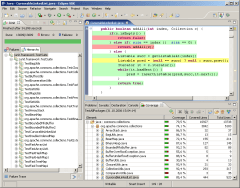
 In a previous post, I explained how to visualize what part of your code is covered by your tests.
This post explores two questions that are perhaps more important: why and what code coverage to measure.
Why We Measure Code Coverage
What does it mean for a statement to be covered by tests? Well, it means that the statement was executed while the tests ran, nothing more, nothing less.
We can’t automatically assume that the statement is tested, since the bare fact that a statement was executed doesn’t imply that the effects of that execution were verified by the tests.
If you practice Test-First Programming, then the tests are written before the code. A new statement is added to the code only to make a failing test pass. So with Test-First Programming, you know that each executed statement is also a tested statement.
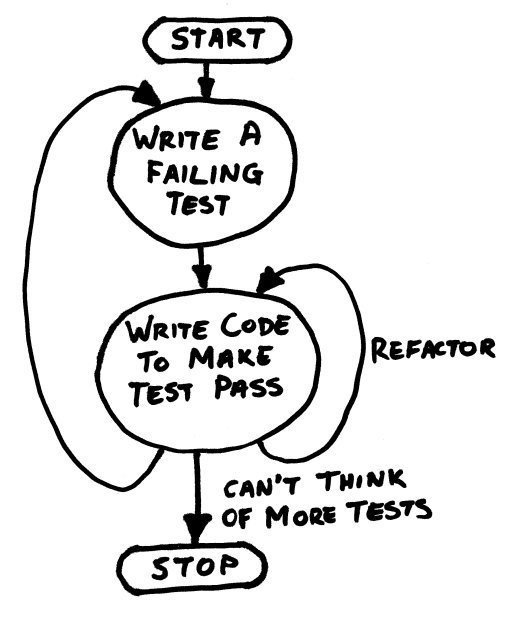 If you don’t write your tests first, then all bets are off. Since Test-First Programming isn’t as popular as I think it should be, let’s assume for the remainder of this post that you’re not practicing it.
Then what good does it do us to know that a statement is executed?
Well, if the next statement is also executed, then we know that the first statement didn’t throw an exception.
That doesn’t help us much either, however. Most statements should not throw an exception, but some statements clearly should. So in general, we still don’t get a lot of value out of knowing that a statement is executed.
The true value of measuring code coverage is therefore not in the statements that are covered, but in the statements that are not covered! Any statement that is not executed while running the tests is surely not tested.
Uncovered code indicates that we’re missing tests.
What Code Coverage We Should Measure
Our next job is to figure out what tests are missing, so we can add them. How can we do that?
Since we’re measuring code coverage, we know the target of the missing tests, namely the statements that were not executed.
 If some of those statements are in a single class, and you have unit tests for that class, it’s easy to see that those unit tests are incomplete.
Unit tests can definitely benefit from measuring code coverage.
What about acceptance tests? Some code can easily be related to a single feature, so in those cases we could add an acceptance test.
In general, however, the relationship between a single line of code and a feature is weak. Just think of all the code we re-use between features. So we shouldn’t expect to always be able to tell by looking at the code what acceptance test we’re missing.
It makes sense to measure code coverage for unit tests, but not so much for acceptance tests.
Code Coverage on Acceptance Tests Can Reveal Dead Code
 One thing we can do by measuring code coverage on acceptance tests, is find dead code.
Dead code is code that is not executed, except perhaps by unit tests. It lives on in the code base like a zombie.
Dead code takes up space, but that’s not usually a big problem.
Some dead code can be detected by other means, like by your IDE. So all in all, it seems that we’re not gaining much by measuring code coverage for acceptance tests.
Code Coverage on Acceptance Tests May Be Dangerous
OK, so we don’t gain much by measuring coverage on acceptance tests. But no harm, no foul, right?
Well, that remains to be seen.
Some organizations impose targets for code coverage. Mindlessly following a rule is not a good idea, but, alas, such is often the way of big organizations. Anyway, an imposed number of, say, 75% line coverage may be achievable by executing only the acceptance tests.
So developers may have an incentive to focus their tests exclusively on acceptance tests.
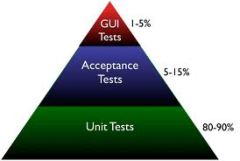 This is not as it should be according to the Test Pyramid.
Acceptance tests are slower, and, especially when working through a GUI, may also be more brittle than unit tests.
Therefore, they usually don’t go much further than testing the happy path. While it’s great to know that all the units integrate well, the happy path is not where most bugs hide.
Some edge and error cases are very hard to write as automated acceptance tests. For instance, how do you test what happens when the network connection drops out?
These types of failures are much easier explored by unit tests, since you can use mock objects there.
The path of least resistance in your development process should lead developers to do the right thing. The right thing is to have most of the tests in the form of unit tests.
If you enforce a certain amount of code coverage, be sure to measure that coverage on unit tests only.
 Ray on Software Architecture
You must be logged in to post a comment.