TDD and the Transformation Priority Premise

TransformationLast time, we looked at the Red/Green/Refactor phases of Test-Driven Development (TDD).

This time we’ll take a detailed look at the transformations applied in the Green phase.

The Transformation Priority Premise

Most of you will have heard of the refactorings we apply in the last TDD phase, but there are corresponding standardized code changes in the Green phase as well. Uncle Bob Martin named them transformations.

The Transformation Priority Premise (TPP) claims that these transformations have an inherent order, and that picking transformation that are higher on the list leads to better algorithms.

Anecdotal evidence is provided by the example of sorting, where violating the order leads to bubble sort, while the correct order leads to quicksort.

After some modifications based on posts by other people, Uncle Bob arrived at the following ordered list of transformations:

Transformation Description
{}–>nil no code at all->code that employs nil
nil->constant
constant->constant+ a simple constant to a more complex constant
constant->scalar replacing a constant with a variable or an argument
statement->statements adding more unconditional statements
unconditional->if splitting the execution path
scalar->array
array->container ??? this one is never used nor explained
statement->tail-recursion
if->while
statement->recursion
expression->function replacing an expression with a function or algorithm
variable->assignment replacing the value of a variable
case adding a case (or else) to an existing switch or if

Applying the TPP to the Roman Numerals Kata
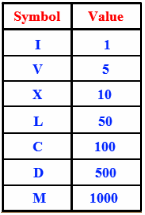
Roman numeral symbolsReading about something gives only shallow knowledge, so let’s try out the TPP on a small, familiar problem: the Roman Numerals kata.

For those of you who are unfamiliar with it: the objective is to translate numbers into Roman. See the table at the left for an overview of the Roman symbols and their values.

As always in TDD, we start off with the simplest case:

public class RomanNumeralsTest {

  @Test
  public void arabicToRoman() {
    Assert.assertEquals("i", "i", RomanNumerals.arabicToRoman(1));
  }

}

We get this to compile with:

public class RomanNumerals {

  public static String arabicToRoman(int arabic) {
    return null;
  }

}

Note that we’ve already applied the first transformation on the list: {}->nil. We apply the second transformation, nil->constant, to get to green:

public class RomanNumerals {

  public static String arabicToRoman(int arabic) {
    return "i";
  }

}

Now we can add our second test:

public class RomanNumeralsTest {

  @Test
  public void arabicToRoman() {
    assertRoman("i", 1);
    assertRoman("ii", 2);
  }

  private void assertRoman(String roman, int arabic) {
    Assert.assertEquals(roman, roman, 
        RomanNumerals.arabicToRoman(arabic));
  }

}

The only way to make this test pass, is to introduce some conditional (unconditional->if):

  public static String arabicToRoman(int arabic) {
    if (arabic == 2) {
      return "ii";
    }
    return "i";
  }

However, this leads to duplication between the number 2 and the number of is returned. So let’s try a different sequence of transformations. Warning: I’m going into baby steps mode now.

First, do constant->scalar:

public static String arabicToRoman(int arabic) {
  String result = "i";
  return result;
}

Next, statement->statements:

public static String arabicToRoman(int arabic) {
  StringBuilder result = new StringBuilder();
  result.append("i");
  return result.toString();
}

Now we can introduce the if without duplication:

public static String arabicToRoman(int arabic) {
  StringBuilder result = new StringBuilder();
  if (arabic >= 1) {
    result.append("i");
  }
  return result.toString();
}

And then another statement->statements:

public static String arabicToRoman(int arabic) {
  StringBuilder result = new StringBuilder();
  if (arabic >= 1) {
    result.append("i");
    arabic -= 1;
  }
  return result.toString();
}

And finally we do if->while:

public static String arabicToRoman(int arabic) {
  StringBuilder result = new StringBuilder();
  while (arabic >= 1) {
    result.append("i");
    arabic -= 1;
  }
  return result.toString();
}

Our test now passes. And so does the test for 3, by the way.

With our refactoring hat on, we spot some more subtle duplication: between the number 1 and the string i. They both express the same concept (the number 1), but are different versions of it: one Arabic and one Roman.

We should introduce a class to capture this concept:

public class RomanNumerals {

  public static String arabicToRoman(int arabic) {
    StringBuilder result = new StringBuilder();
    RomanNumeral numeral = new RomanNumeral("i", 1);
    while (arabic >= numeral.getValue()) {
      result.append(numeral.getSymbol());
      arabic -= numeral.getValue();
    }
    return result.toString();
  }

}

public class RomanNumeral {

  private final String symbol;
  private final int value;

  public RomanNumeral(String symbol, int value) {
    this.symbol = symbol;
    this.value = value;
  }

  public int getValue() {
    return value;
  }

  public String getSymbol() {
    return symbol;
  }

}

Now it turns out that we have a case of feature envy. We can make that more obvious by extracting out a method:

public static String arabicToRoman(int arabic) {
  StringBuilder result = new StringBuilder();
  RomanNumeral numeral = new RomanNumeral("i", 1);
  arabic = append(arabic, result, numeral);
  return result.toString();
}

private static int append(int arabic, StringBuilder builder,
    RomanNumeral numeral) {
  while (arabic >= numeral.getValue()) {
    builder.append(numeral.getSymbol());
    arabic -= numeral.getValue();
  }
 return arabic;
}

Now we can move the append() method to RomanNumeral:

public class RomanNumerals {

  public static String arabicToRoman(int arabic) {
    StringBuilder result = new StringBuilder();
    RomanNumeral numeral = new RomanNumeral("i", 1);
    arabic = numeral.append(arabic, result);
    return result.toString();
  }

}

public class RomanNumeral {

  private final String symbol;
  private final int value;

  public RomanNumeral(String symbol, int value) {
    this.symbol = symbol;
    this.value = value;
  }

  public int getValue() {
    return value;
  }

  public String getSymbol() {
    return symbol;
  }

  public int append(int arabic, StringBuilder builder) {
    while (arabic >= getValue()) {
      builder.append(getSymbol());
      arabic -= getValue();
    }
    return arabic;
  }

}

We can further clean up by inlining the getters that are now only used in the RomanNumeral class:

public class RomanNumeral {

  private final String symbol;
  private final int value;

  public RomanNumeral(String symbol, int value) {
    this.symbol = symbol;
    this.value = value;
  }

  public int append(int arabic, StringBuilder builder) {
    while (arabic >= value) {
      builder.append(symbol);
      arabic -= value;
    }
    return arabic;
  }

}

There is one other problem with this code: we pass in arabic and builder as two separate parameters, but they are not independent. The former represents the part of the arabic number not yet processed, while the latter represents the part that is processed. So we should introduce another class to capture the shared concept:

public class RomanNumerals {

  public static String arabicToRoman(int arabic) {
    ArabicToRomanConversion conversion
        = new ArabicToRomanConversion(arabic);
    RomanNumeral numeral = new RomanNumeral("i", 1);
    numeral.append(conversion);
    return conversion.getResult();
  }

}

public class RomanNumeral {

  private final String symbol;
  private final int value;

  public RomanNumeral(String symbol, int value) {
    this.symbol = symbol;
    this.value = value;
  }

  public void append(ArabicToRomanConversion conversion) {
    while (conversion.getRemainder() >= value) {
      conversion.append(symbol, value);
    }
  }

}

public class ArabicToRomanConversion {

  private int remainder;
  private final StringBuilder result;

  public ArabicToRomanConversion(int arabic) {
    this.remainder = arabic;
    this.result = new StringBuilder();
  }

  public String getResult() {
    return result.toString();
  }

  public int getRemainder() {
    return remainder;
  }

  public void append(String symbol, int value) {
    result.append(symbol);
    remainder -= value;
  }

}

Unfortunately, we now have a slight case feature envy in RomanNumeral. We use conversion twice and our own members three times, so it’s not too bad, but let’s think about this for a moment.

Does it make sense to let the roman numeral know about an conversion process from Arabic to Roman? I think not, so let’s move the code to the proper place:

public class RomanNumerals {

  public static String arabicToRoman(int arabic) {
    ArabicToRomanConversion conversion
        = new ArabicToRomanConversion(arabic);
    RomanNumeral numeral = new RomanNumeral("i", 1);
    conversion.process(numeral);
    return conversion.getResult();
  }

}

public class RomanNumeral {

  private final String symbol;
  private final int value;

  public RomanNumeral(String symbol, int value) {
    this.symbol = symbol;
    this.value = value;
  }

  public String getSymbol() {
    return symbol;
  }

  public int getValue() {
    return value;
  }

}

public class ArabicToRomanConversion {

  private int remainder;
  private final StringBuilder result;

  public ArabicToRomanConversion(int arabic) {
    this.remainder = arabic;
    this.result = new StringBuilder();
  }

  public String getResult() {
    return result.toString();
  }

  public void process(RomanNumeral numeral) {
    while (remainder >= numeral.getValue()) {
      append(numeral.getSymbol(), numeral.getValue());
    }
  }

  private void append(String symbol, int value) {
    result.append(symbol);
    remainder -= value;
  }

}

We had to re-introduce the getters for RomanNumeral‘s fields to get this to compile. We could have avoided that rework by introducing the ArabicToRomanConversion class first. Hmm, maybe refactorings have an inherent order too!

OK, on to our next test: 4. We can make that pass with another series of transformations. First, scalar->array:

public static String arabicToRoman(int arabic) {
  ArabicToRomanConversion conversion
      = new ArabicToRomanConversion(arabic);
  RomanNumeral[] numerals = new RomanNumeral[] {
    new RomanNumeral("i", 1)
  };
  conversion.process(numerals[0]);
  return conversion.getResult();
}

Next, constant->scalar:

public static String arabicToRoman(int arabic) {
  ArabicToRomanConversion conversion
      = new ArabicToRomanConversion(arabic);
  RomanNumeral[] numerals = new RomanNumeral[] {
    new RomanNumeral("i", 1)
  };
  int index = 0;
  conversion.process(numerals[index]);
  return conversion.getResult();
}

Now we need an if:

public static String arabicToRoman(int arabic) {
  ArabicToRomanConversion conversion
      = new ArabicToRomanConversion(arabic);
  RomanNumeral[] numerals = new RomanNumeral[] {
    new RomanNumeral("i", 1)
  };
  int index = 0;
  if (index < 1) {
    conversion.process(numerals[index]);
  }
  return conversion.getResult();
}

And another constant->scalar:

public static String arabicToRoman(int arabic) {
  ArabicToRomanConversion conversion
      = new ArabicToRomanConversion(arabic);
  RomanNumeral[] numerals = new RomanNumeral[] {
    new RomanNumeral("i", 1)
  };
  int index = 0;
  if (index < numerals.length) {
    conversion.process(numerals[index]);
  }
  return conversion.getResult();
}

You can probably see where this is going. Next is statement->statements:

public static String arabicToRoman(int arabic) {
  ArabicToRomanConversion conversion
      = new ArabicToRomanConversion(arabic);
  RomanNumeral[] numerals = new RomanNumeral[] {
    new RomanNumeral("i", 1)
  };
  int index = 0;
  if (index < numerals.length) {
    conversion.process(numerals[index]);
    index++;
  }
  return conversion.getResult();
}

Then if->while:

public static String arabicToRoman(int arabic) {
  ArabicToRomanConversion conversion
      = new ArabicToRomanConversion(arabic);
  RomanNumeral[] numerals = new RomanNumeral[] {
    new RomanNumeral("i", 1)
  };
  for (RomanNumeral numeral : numerals) {
    conversion.process(numeral);
  }
  return conversion.getResult();
}

And finally constant->constant+:

public static String arabicToRoman(int arabic) {
  ArabicToRomanConversion conversion
      = new ArabicToRomanConversion(arabic);
  RomanNumeral[] numerals = new RomanNumeral[] {
    new RomanNumeral("iv", 4),
    new RomanNumeral("i", 1)
  };
  for (RomanNumeral numeral : numerals) {
    conversion.process(numeral);
  }
  return conversion.getResult();
}

Now we have our algorithm complete and all we need to do is add to the numerals array. BTW, this should be a constant:

public class RomanNumerals {

  private static final RomanNumeral[] ROMAN_NUMERALS 
      = new RomanNumeral[] {
    new RomanNumeral("iv", 4),
    new RomanNumeral("i", 1)
  };

  public static String arabicToRoman(int arabic) {
    ArabicToRomanConversion conversion
        = new ArabicToRomanConversion(arabic);
    for (RomanNumeral romanNumeral : ROMAN_NUMERALS) {
      conversion.process(romanNumeral);
    }
    return conversion.getResult();
  }

}

Also, it looks like we have another case of feature envy here that we could resolve as follows:

public class RomanNumerals {

  public static String arabicToRoman(int arabic) {
    return new ArabicToRomanConversion(arabic).getResult();
  }

}

public class ArabicToRomanConversion {

  private static final RomanNumeral[] ROMAN_NUMERALS 
      = new RomanNumeral[] {
    new RomanNumeral("iv", 4),
    new RomanNumeral("i", 1)
  };

  private int remainder;
  private final StringBuilder result;

  public ArabicToRomanConversion(int arabic) {
    this.remainder = arabic;
    this.result = new StringBuilder();
  }

  public String getResult() {
    for (RomanNumeral romanNumeral : ROMAN_NUMERALS) {
      process(romanNumeral);
    }
    return result.toString();
  }

  private void process(RomanNumeral numeral) {
    while (remainder >= numeral.getValue()) {
      append(numeral.getSymbol(), numeral.getValue());
    }
  }

  private void append(String symbol, int value) {
    result.append(symbol);
    remainder -= value;
  }

}

Retrospective

Magnifying glassThe first thing I noticed, is that following the TPP led me to discover the basic algorithm a lot quicker than in some of my earlier attempts at this kata.

The next interesting thing is that there seems to be an interplay between transformations and refactorings.

You can either perform a transformation and then clean up with refactorings, or prevent the need to refactor by using only transformations that don’t introduce duplication. Doing the latter is more efficient and also seems to speed up discovery of the required algorithm.

Certainly food for thought. It seems like some more experimentation is in order.

Update: Here is a screencast of a slightly better version of the kata:

The Differences Between Test-First Programming and Test-Driven Development

Red, Green, RefactorThere seems to be some confusion between Test-First Programming and Test-Driven Development (TDD).

This post explains that merely writing the tests before the code doesn’t necessarily make it TDD.

Similarities Between Test-First Programming and Test-Driven Development

It’s not hard to see why people would confuse the two, since they have many things in common.

My classification of tests distinguishes six dimensions: who, what, when, where, why, and how.

Test-First programming and Test-Driven Development score the same in five of those six dimensions: they are both automated (how) functional (what) programmer (who) tests at the unit level (where) written before the code (when).

The only difference is in why they are written.

Differences Between Test-First Programming and Test-Driven Development

Test-First Programming mandates that tests be written before the code, so that the code will always be testable. This is more efficient than having to change already written code to make it testable.

Test-First Programming doesn’t say anything about other activities in the development cycle, like requirements analysis and design.

This is a big difference with Test-Driven Development (TDD), since in TDD, the tests drive the design. Let’s take a detailed look at the TDD process of Red/Green/Refactor, to find out exactly how that differs from Test-First Programming.

Red

Unit test failureIn the first TDD phase we write a test. Since there is no code yet to make the test pass, this test will fail.
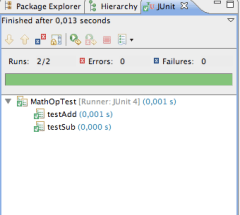
Unit testing frameworks like JUnit will show the result in red to indicate failure.

In both Test-First Programming and Test-Driven Development, we use this phase to record a requirement as a test.

TDD, however, goes a step further: we also explicitly design the client API. Test-First Programming is silent on how and when we should do that.

Green

In the next phase, we write code to make the test pass. Unit testing frameworks show passing tests in green.

In Test-Driven Development, we always write the simplest possible code that makes the test pass. This allows us to keep our options open and evolve the design.

JUnit passing testWe may evolve our code using simple transformations to increase the complexity of the code enough to satisfy the requirements that are expressed in the tests.

Test-First Programming is silent on what sort of code you write in this phase and how you do it, as long as the test will pass.

Refactor

In the final TDD phase, the code is refactored to improve the design of the implementation.

This phase is completely absent in Test-First Programming.

Summary of Differences

So we’ve uncovered two differences that distinguish Test-First Programming from Test-Driven Development:

  1. Test-Driven Development uses the Red phase to design the client API. Test-First Programming is silent on when and how you arrive at a good client API.
  2. Test-Driven Development splits the coding phase into two compared to Test-First Programming. In the first sub-phase (Green), the focus is on meeting the requirements. In the second sub-phase (Refactor), the focus is on creating a good design.

I think there is a lot of value in the second point. Many developers focus too much on getting the requirements implemented and forget to clean up their code. The result is an accumulation of technical debt that will slow development down over time.

TDD also splits the design activity into two. First we design the external face of the code, i.e. the API. Then we design the internal organization of the code.

This is a useful distinction as well, because the heuristics you would use to tell a good API from a bad one are different from those for good internal design.

Try Before You Buy

KataAll in all I think Test-Driven Development provides sufficient value over Test-First Programming to give it a try.

All new things are hard, however, so be sure to practice TDD before you start applying it in the wild.

There are numerous katas that can help you with that, like the Roman Numerals Kata.

Building Both Security and Quality In

One of the important things in a Security Development Lifecycle (SDL) is to feed back information about vulnerabilities to developers.

This post relates that practice to the Agile practice of No Bugs.

The Security Incident Response

Even though we work hard to ship our software without security vulnerabilities, we never succeed 100%.

When an incident is reported (hopefully responsibly), we execute our security response plan. We must be careful to fix the issue without introducing new problems.

Next, we should also look for similar issues to the one reported. It’s not unlikely that there are issues in other parts of the application that are similar to the reported one. We should find and fix those as part of the same security update.

Finally, we should do a root cause analysis to determine why this weakness slipped through the cracks in the first place. Armed with that knowledge, we can adapt our process to make sure that similar issues will not occur in the future.

From Security To Quality

The process outlined above works well for making our software ever more secure.

But security weaknesses are essentially just bugs. Security issues may have more severe consequences than regular bugs, but most regular bugs are expensive to fix once the software is deployed as well.

So it actually makes sense to treat all bugs, security or otherwise, the same way.

As the saying goes, an ounce of prevention is worth a pound of cure. Just as we need to build security in, we also need to build quality in general in.

Building Quality In Using Agile Methods

This has been known in the Agile and Lean communities for a long time. For instance, James Shore wrote about it in his excellent book The Art Of Agile Development and Elisabeth Hendrickson thinks that there should be so little bugs that they don’t need triaging.

Some people object to the Zero Defects mentality, claiming that it’s unrealistic.

There is, however, clear evidence of much lower defect rates for Agile development teams. Many Lean implementations also report successes in their quest for Zero Defects.

So there is at least anecdotal evidence that a very significant reduction of defects is possible.

This will require change, of course. Testers need to change and so do developers. And then everybody on the team needs to speak the same language and work together as a single team instead of in silos.

If we do this well, we’ll become bug exterminators that delight our customers with software that actually works.

Software Development and Lifelong Learning

The main constraint in software development is learning. This means that learning is a core skill for developers and we should not think we’re done learning after graduation. This post explores some different ways in which to learn.

Go To Conferences

Conferences are a great place to learn new things, but also to meet new people. New people can provide new ways of looking at things, which helps with learning as well.

You can either go to big and broad conferences, like Java One or the RSA conference, or you can attend a smaller, more focused event. Some of these smaller events may not be as well-known, but there are some real gems nonetheless.

Take XML Amsterdam, for example, a small conference here in the Netherlands with excellent international speakers and attendees (even some famous ones).

Attend Workshops

Learning is as much about doing as it is about hearing and watching. Some conferences may have hands-on sessions or labs, but they’re in the minority. So just going to conferences isn’t good enough.

A more practical variant are workshops. They are mostly organized by specific communities, like Java User Groups.

One particularly useful form for developers is the code retreat. Workshops are much more focused than conferences and still provide some of the same networking opportunities.

Get Formal Training

Lots of courses are being offered, many of them conveniently online. One great (and free) example is Cryptography from Coursera.

Some of these course lead to certifications. The world is sharply divided into those who think certifications are a must and those that feel they are evil. I’ll keep my opinion on this subject to myself for once 😉 but whatever you do, focus on the learning, not on the piece of paper.

Learn On The Job

There is a lot to be learned during regular work activities as well.

You can organize that a bit better by doing something like job rotation. Good forms of job rotation for developers are collective code ownership and swarming.

Pair programming is an excellent way to learn all kinds of things, from IDE shortcuts to design patterns.

Practice in Private

Work has many distractions, though, like Getting a Story Done.

Open source is an alternative, in the sense that it takes things like deadlines away, which can help with learning.

However, that still doesn’t provide the systematic exploration that is required for the best learning. So practicing on “toy problems” is much more effective.

There are many katas that do just that, like the Roman Numerals Kata. They usually target a specific skill, like Test-Driven Development (TDD).

A Classification of Tests

There are many ways of testing software. This post uses the five Ws to classify the different types of tests and shows how to use this classification.

Programmer vs Customer (Who)

Tests exist to give confidence that the software works as expected.

But whose expectations are we talking about? Developers have different types of expectations about their code than users have about the application. Each audience deserves its own set of tests to remain confident enough to keep going.

Functionality vs Performance vs Load vs Security (What)

When not specified, it’s assumed that what is being tested is whether the application functions the way it’s supposed to. However, we can also test non-functional aspects of an application, like security.

Before Writing Code vs After (When)

Tests can be written after the code is complete to verify that it works (test-last), or they can be written first to specify how the code should work (test-first). Writing the test first may seem counter-intuitive or unnatural, but there are some advantages:

  • When you write the tests first, you’ll guarantee that the code you later write will be testable (duh). Anybody who’s written tests for legacy code will surely acknowledge that that’s not a given if you write the code first
  • Writing the tests first can prevent defects from entering the code and that is more efficient than introducing, finding, and then fixing bugs
  • Writing the tests first makes it possible for the tests to drive the design. By formulating your test, in code, in a way that looks natural, you design an API that is convenient to use. You can even design the implementation

Unit vs Integration vs System (Where)


Tests can be written at different levels of abstraction. Unit tests test a single unit (e.g. class) in isolation.

Integration tests focus on how the units work together. System tests look at the application as a whole.

As you move up the abstraction level from unit to system, you require fewer tests.

Verification vs Specification vs Design (Why)

There can be different reasons for writing tests. All tests verify that the code works as expected, but some tests can start their lives as specifications of how yet-to-be-written code should work. In the latter situation, the tests can be an important tool for communicating how the application should behave.

We can even go a step further and let the tests also drive how the code should be organized. This is called Test-Driven Design (TDD).

Manual vs Automated Tests (How)


Tests can be performed by a human or by a computer program. Manual testing is most useful in the form of exploratory testing.

When you ship the same application multiple times, like with releases of a product or sprints of an Agile project, you should automate your tests to catch regressions. The amount of software you ship will continue to grow as you add features and your testing effort will do so as well. If you don’t automate your tests, you will eventually run out of time to perform all of them.

Specifying Tests Using the Classification

With the above classifications we can be very specific about our tests. For instance:

  • Tests in TDD are automated (how) programmer (who) tests that design (why) functionality (what) at the unit or integration level (where) before the code is written (when)
  • BDD scenarios are automated (how) customer (who) tests that specify (why) functionality (what) at the system level (where) before the code is written (when)
  • Exploratory tests are manual (how) customer (who) tests that verify (why) functionality (what) at the system level (where) after the code is written (when)
  • Security tests are automated (how) customer (who) tests that verify (why) security (what) at the system level (where) after the code is written (when)

By being specific, we can avoid semantic diffusion, like when people claim that “tests in TDD do not necessarily need to be written before the code”.

Reducing Risk Using the Classification

Sometimes you can select a single alternative along a dimension. For instance, you could perform all your testing manually, or you could use tests exclusively to verify.

For other dimensions, you really need to cover all the options. For instance, you need tests at the unit and integration and system level and you need to test for functionality and performance and security. If you don’t, you are at risk of not knowing that your application is flawed.

Proper risk management, therefore, mandates that you shouldn’t exclusively rely on one type of tests. For instance, TDD is great, but it doesn’t give the customer any confidence. You should carefully select a range of test types to cover all aspects that are relevant for your situation.

Visualizing Code Coverage in Eclipse with EclEmma

Last time, we saw how Behavior-Driven Development (BDD) allows us to work towards a concrete goal in a very focused way.

In this post, we’ll look at how the big BDD and the smaller TDD feedback loops eliminate waste and how you can visualize that waste using code coverage tools like EclEmma to see whether you execute your process well.

The Relation Between BDD and TDD

Depending on your situation, running BDD scenarios may take a lot of time. For instance, you may need to first create a Web Application Archive (WAR), then start a web server, deploy your WAR, and finally run your automated acceptance tests using Selenium.

This is not a convenient feedback cycle to run for every single line of code you write.

So chances are that you’ll write bigger chunks of code. That increases the risk of introducing mistakes, however. Baby steps can mitigate that risk. In this case, that means moving to Test-First programming, preferably Test-Driven Development (TDD).

The link between a BDD scenario and a bunch of unit tests is the top-down test. The top-down test is a translation of the BDD scenario into test code. From there, you descend further down into unit tests using regular TDD.

This translation of BDD scenarios into top-down tests may seem wasteful, but it’s not.

Top-down tests only serve to give the developer a shorter feedback cycle. You should never have to leave your IDE to determine whether you’re done. The waste of the translation is more than made up for by the gains of not having to constantly switch to the larger BDD feedback cycle. By doing a little bit more work, you end up going faster!

If you’re worried about your build time increasing because of these top-down tests, you may even consider removing them after you’ve made them pass, since their risk-reducing job is then done.

Both BDD and TDD Eliminate Waste Using JIT Programming

Both BDD and TDD operate on the idea of Just-In-Time (JIT) coding. JIT is a Lean principle for eliminating waste; in this case of writing unnecessary code.

There are many reasons why you’d want to eliminate unnecessary code:

  • Since it takes time to write code, writing less code means you’ll be more productive (finish more stories per iteration)
  • More code means more bugs
  • In particular, more code means more opportunities for security vulnerabilities
  • More code means more things a future maintainer must understand, and thus a higher risk of bugs introduced during maintenance due to misunderstandings

Code Coverage Can Visualize Waste

With BDD and TDD in your software development process, you expect less waste. That’s the theory, at least. How do we prove this in practice?

Well, let’s look at the process:

  1. BDD scenarios define the acceptance criteria for the user stories
  2. Those BDD scenarios are translated into top-down tests
  3. Those top-down tests lead to unit tests
  4. Finally, those unit tests lead to production code

The last step is easiest to verify: no code should have been written that wasn’t necessary for making some unit test pass. We can prove that by measuring code coverage while we execute the unit tests. Any code that is not covered is by definition waste.

EclEmma Shows Code Coverage in Eclipse

We use Cobertura in our Continuous Integration build to measure code coverage. But that’s a long feedback cycle again.

Therefore, I like to use EclEmma to measure code coverage while I’m in the zone in Eclipse.

EclEmma turns covered lines green, uncovered lines red, and partially covered lines yellow.

You can change these colors using Window|Preferences|Java|Code coverage. For instance, you could change Full Coverage to white, so that the normal case doesn’t introduce visual clutter and only the exceptions stand out.

The great thing about EclEmma is that it let’s you measure code coverage without making you change the way you work.

The only difference is that instead of choosing Run As|JUnit Test (or Alt+Shift+X, T), you now choose Coverage As|JUnit test (or Alt+Shift+E, T). To re-run the last coverage, use Ctrl+Shift+F11 (instead of Ctrl+F11 to re-run the last launch).

If your fingers are conditioned to use Alt+Shift+X, T and/or Ctrl+F11, you can always change the key bindings using Window|Preferences|General|Keys.

In my experience, the performance overhead of EclEmma is low enough that you can use it all the time.

EclEmma Helps You Monitor Your Agile Process

The feedback from EclEmma allows you to immediately see any waste in the form of unnecessary code. Since there shouldn’t be any such waste if you do BDD and TDD well, the feedback from EclEmma is really feedback on how well you execute your BDD/TDD process. You can use this feedback to hone your skills and become the best developer you can be.

Behavior-Driven Development (BDD) with JBehave, Gradle, and Jenkins

Behavior-Driven Development (BDD) is a collaborative process where the Product Owner, developers, and testers cooperate to deliver software that brings value to the business.

BDD is the logical next step up from Test-Driven Development (TDD).

Behavior-Driven Development

In essence, BDD is a way to deliver requirements. But not just any requirements, executable ones! With BDD, you write scenarios in a format that can be run against the software to ascertain whether the software behaves as desired.

Scenarios

Scenarios are written in Given, When, Then format, also known as Gherkin:

Given the ATM has $250
And my balance is $200
When I withdraw $150
Then the ATM has $100
And my balance is $50

Given indicates the initial context, When indicates the occurrence of an interesting event, and Then asserts an expected outcome. And may be used to in place of a repeating keyword, to make the scenario more readable.

Given/When/Then is a very powerful idiom, that allows for virtually any requirement to be described. Scenarios in this format are also easily parsed, so that we can automatically run them.

BDD scenarios are great for developers, since they provide quick and unequivocal feedback about whether the story is done. Not only the main success scenario, but also alternate and exception scenarios can be provided, as can abuse cases. The latter requires that the Product Owner not only collaborates with testers and developers, but also with security specialists. The payoff is that it becomes easier to manage security requirements.

Even though BDD is really about the collaborative process and not about tools, I’m going to focus on tools for the remainder of this post. Please keep in mind that tools can never save you, while communication and collaboration can. With that caveat out of the way, let’s get started on implementing BDD with some open source tools.

JBehave

JBehave is a BDD tool for Java. It parses the scenarios from story files, maps them to Java code, runs them via JUnit tests, and generates reports.

Eclipse

JBehave has a plug-in for Eclipse that makes writing stories easier with features such as syntax highlighting/checking, step completion, and navigation to the step implementation.

JUnit

Here’s how we run our stories using JUnit:

@RunWith(AnnotatedEmbedderRunner.class)
@UsingEmbedder(embedder = Embedder.class, generateViewAfterStories = true,
    ignoreFailureInStories = true, ignoreFailureInView = false, 
    verboseFailures = true)
@UsingSteps(instances = { NgisRestSteps.class })
public class StoriesTest extends JUnitStories {

  @Override
  protected List<String> storyPaths() {
    return new StoryFinder().findPaths(
        CodeLocations.codeLocationFromClass(getClass()).getFile(),
        Arrays.asList(getStoryFilter(storyPaths)), null);
  }

  private String getStoryFilter(String storyPaths) {
    if (storyPaths == null) {
      return "*.story";
    }
    if (storyPaths.endsWith(".story")) {
      return storyPaths;
    }
    return storyPaths + ".story";
  }

  private List<String> specifiedStoryPaths(String storyPaths) {
    List<String> result = new ArrayList<String>();
    URI cwd = new File("src/test/resources").toURI();
    for (String storyPath : storyPaths.split(File.pathSeparator)) {
      File storyFile = new File(storyPath);
      if (!storyFile.exists()) {
        throw new IllegalArgumentException("Story file not found: " 
          + storyPath);
      }
      result.add(cwd.relativize(storyFile.toURI()).toString());
    }
    return result;
  }

  @Override
  public Configuration configuration() {
    return super.configuration()
        .useStoryReporterBuilder(new StoryReporterBuilder()
            .withFormats(Format.XML, Format.STATS, Format.CONSOLE)
            .withRelativeDirectory("../build/jbehave")
        )
        .usePendingStepStrategy(new FailingUponPendingStep())
        .useFailureStrategy(new SilentlyAbsorbingFailure());
  }

}

This uses JUnit 4’s @RunWith annotation to indicate the class that will run the test. The AnnotatedEmbedderRunner is a JUnit Runner that JBehave provides. It looks for the @UsingEmbedder annotation to determine how to run the stories:

  • generateViewAfterStories instructs JBehave to create a test report after running the stories
  • ignoreFailureInStories prevents JBehave from throwing an exception when a story fails. This is essential for the integration with Jenkins, as we’ll see below

The @UsingSteps annotation links the steps in the scenarios to Java code. More on that below. You can list more than one class.

Our test class re-uses the JUnitStories class from JBehave that makes it easy to run multiple stories. We only have to implement two methods: storyPaths() and configuration().

The storyPaths() method tells JBehave where to find the stories to run. Our version is a little bit complicated because we want to be able to run tests from both our IDE and from the command line and because we want to be able to run either all stories or a specific sub-set.

We use the system property bdd.stories to indicate which stories to run. This includes support for wildcards. Our naming convention requires that the story file names start with the persona, so we can easily run all stories for a single persona using something like -Dbdd.stories=wanda_*.

The configuration() method tells JBehave how to run stories and report on them. We need output in XML for further processing in Jenkins, as we’ll see below.

One thing of interest is the location of the reports. JBehave supports Maven, which is fine, but they assume that everybody follows Maven conventions, which is really not. The output goes into a directory called target by default, but we can override that by specifying a path relative to the target directory. We use Gradle instead of Maven, and Gradle’s temporary files go into the build directory, not target. More on Gradle below.

Steps

Now we can run our stories, but they will fail. We need to tell JBehave how to map the Given/When/Then steps in the scenarios to Java code. The Steps classes determine what the vocabulary is that can be used in the scenarios. As such, they define a Domain Specific Language (DSL) for acceptance testing our application.

Our application has a RESTful interface, so we wrote a generic REST DSL. However, due to the HATEOAS constraint in REST, a client needs a lot of calls to discover the URIs that it should use. Writing scenarios gets pretty boring and repetitive that way, so we added an application-specific DSL on top of the REST DSL. This allows us to write scenarios in terms the Product Owner understands.

Layering the application-specific steps on top of generic REST steps has some advantages:

  • It’s easy to implement new application-specific DSL, since they only need to call the REST-specific DSL
  • The REST-specific DSL can be shared with other projects

Gradle

With the Steps in place, we can run our stories from our favorite IDE. That works great for developers, but can’t be used for Continuous Integration (CI).

Our CI server runs a headless build, so we need to be able to run the BDD scenarios from the command line. We automate our build with Gradle and Gradle can already run JUnit tests. However, our build is a multi-project build. We don’t want to run our BDD scenarios until all projects are built, a distribution is created, and the application is started.

So first off, we disable running tests on the project that contains the BDD stories:

test {
  onlyIf { false } // We need a running server
}

Next, we create another task that can be run after we start our application:

task acceptStories(type: Test) {
  ignoreFailures = true
  doFirst {
    // Need 'target' directory on *nix systems to get any output
    file('target').mkdirs()

    def filter = System.getProperty('bdd.stories') 
    if (filter == null) {
      filter = '*'
    }
    def stories = sourceSets.test.resources.matching { 
      it.include filter
    }.asPath
    systemProperty('bdd.stories', stories)
  }
}

Here we see the power of Gradle. We define a new task of type Test, so that it already can run JUnit tests. Next, we configure that task using a little Groovy script.

First, we must make sure the target directory exists. We don’t need or even want it, but without it, JBehave doesn’t work properly on *nix systems. I guess that’s a little Maven-ism 😦

Next, we add support for running a sub-set of the stories, again using the bdd.stories system property. Our story files are located in src/test/resources, so that we can easily get access to them using the standard Gradle test source set. We then set the system property bdd.stories for the JVM that runs the tests.

Jenkins

So now we can run our BDD scenarios from both our IDE and the command line. The next step is to integrate them into our CI build.

We could just archive the JBehave reports as artifacts, but, to be honest, the reports that JBehave generates aren’t all that great. Fortunately, the JBehave team also maintains a plug-in for the Jenkins CI server. This plug-in requires prior installation of the xUnit plug-in.

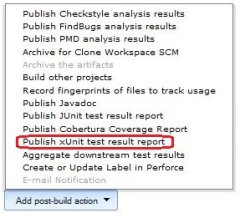
After installation of the xUnit and JBehave plug-ins into jenkins, we can configure our Jenkins job to use the JBehave plug-in. First, add an xUnit post-build action. Then, select the JBehave test report.

With this configuration, the output from running JBehave on our BDD stories looks just like that for regular unit tests:

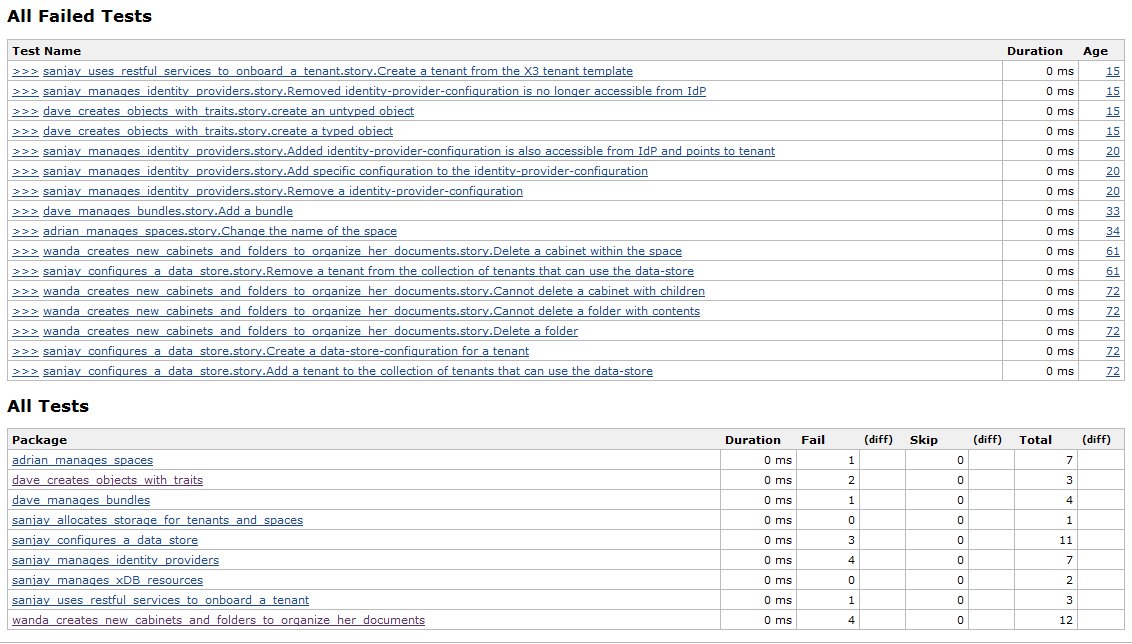
Note that the yellow part in the graph indicates pending steps. Those are used in the BDD scenarios, but have no counterpart in the Java Steps classes. Pending steps are shown in the Skip column in the test results:

Notice how the JBehave Jenkins plug-in translates stories to tests and scenarios to test methods. This makes it easy to spot which scenarios require more work.

Although the JBehave plug-in works quite well, there are two things that could be improved:

  • The output from the tests is not shown. This makes it hard to figure out why a scenario failed. We therefore also archive the JUnit test report
  • If you configure ignoreFailureInStories to be false, JBehave throws an exception on a failure, which truncates the XML output. The JBehave Jenkins plug-in can then no longer parse the XML (since it’s not well formed), and fails entirely, leaving you without test results

All in all these are minor inconveniences, and we ‘re very happy with our automated BDD scenarios.

Practicing TDD using the Roman Numerals kata

Test-Driven Development (TDD) is a scientific approach to software development that supports incremental design. I’ve found that, although very powerful, this approach takes some getting used to. Although the rules of TDD are simple, they’re not always easy:

  1. Write a failing test
  2. Write the simplest bit of code that makes it pass
  3. Refactor the code to follow the rules of simple design

This is also called the Red-Green-Refactor cycle of TDD.

Writing a failing test isn’t always easy. Lots of TDD beginners write tests that are to big; TDD is all about taking baby steps. Likewise, writing the simplest bit of code to make the test pass is sometimes difficult. Many developers are trained to write generic code that can handle more than just the case at hand; they must unlearn these habits and truly focus on doing The Simplest Thing That Could Possibly Work.

The hardest part of TDD, however, is the final step. Some TDD novices skip it altogether, others have trouble evolving their design. Code that follows the rules of simple design

  1. Passes all the tests
  2. Contains no duplication
  3. Clearly expresses the programmer’s intent
  4. Minimizes code

The first is easy, since your xUnit framework will either give you Red or Green. But then the fun begins. Let’s walk through an example to see TDD in action.

We’ll use the Roman Numerals kata for this example. A kata is a term inherited from the martial arts. To get really good at something, you have to practice. The martial arts understood this long before the Software Crafsmanship movement was born.
They use katas to practice their basic moves over and over again. Software katas are similar. They focus on fundamental skills like TDD and incremental design.

In the Roman Numerals kata, we convert Arabic numbers (the one we use daily: 1, 2, 3, 4, 5, …) into their Roman equivalent: I, II, III, IV, V, … It’s a good kata, because it allows one to practice skills in a very concentrated area, as we’ll see.

So let’s get started. The first step is to write a failing test:

public class RomanNumeralsTest {

  @Test
  public void one() {
    Assert.assertEquals("1", "I", RomanNumerals.arabicToRoman(1));
  }

}

Note that this step really is not (only) about tests. It really is about designing your API from the client’s perspective. Think of something that you as a user of the API would like to see to solve your bigger problem. In this kata, the API is just a single method, so there is not much to design.

OK, we’re at Red, so let’s get to Green:

public class RomanNumerals {

  public static String arabicToRoman(int arabic) {
    return "I";
  }

}

But that’s cheating! That’s not an algorithm to convert Arabic numerals into Roman! True, it’s not, but it isn’t cheating either. The rules of TDD state that we should write the simplest code that passes the test. It’s only cheating if you play by the old rules. You must unlearn what you have learned.

Now for the Refactor step. The test passes, there is no duplication, we express our intent (that currently is limited to convert 1 into I) clearly, and we have the absolute minimum number of classes and methods (both 1), so we’re done. Easy, right?

Now we move to the next TDD cycle. First Red:

public class RomanNumeralsTest {

  @Test
  public void oneTwo() {
    Assert.assertEquals("1", "I", RomanNumerals.arabicToRoman(1));
    Assert.assertEquals("2", "II", RomanNumerals.arabicToRoman(2));
  }

}

No need to change our API. In fact we won’t have to change it again for the whole kata. So let’s move to Green:

public static String arabicToRoman(int arabic) {
  if (arabic == 2) {
    return "II";
  }
  return "I";
}

OK, we’re Green. Now let’s look at this code. It’s pretty obvious that if we continue down this path, we’ll end up with very, very bad code. There is no design at all, just a bunch of hacks. That’s why the Refactor step is essential.

We pass the tests, but how about duplication? There is duplication in the Arabic number passed in and the number of I’s the method returns. This may not be obvious to everyone because of the return in the middle of the method. Let’s get rid of it to better expose the duplication…

public static String arabicToRoman(int arabic) {
  StringBuilder result = new StringBuilder();
  if (arabic == 2) {
    result.append("I");
  }
  result.append("I");
  return result.toString();
}

…so that we can remove it:

public static String arabicToRoman(int arabic) {
  StringBuilder result = new StringBuilder();
  for (int i = 0; i < arabic; i++) {
    result.append("I");
  }
  return result.toString();
}

What we did here was generalize an if statement into a for (or while). This is one of a bunch of transformations one often uses in TDD. The net effect of a generalization like this is that we have discovered a rule based on similarities. This means that our code can now handle more cases than the ones we supplied as tests. In this specific case, we can now also convert 3 to III:

@Test
public void oneTwoThreeRepeatIs() {
  Assert.assertEquals("1", "I", RomanNumerals.arabicToRoman(1));
  Assert.assertEquals("2", "II", RomanNumerals.arabicToRoman(2));
  Assert.assertEquals("3", "III", RomanNumerals.arabicToRoman(3));
}

Now that we have removed duplication, let’s look at expressiveness and compactness. Looks OK to me, so let’s move on to the new case. We got 3 covered, so 4 is next:

@Test
public void four() {
  Assert.assertEquals("4", "IV", RomanNumerals.arabicToRoman(4));
}

This fails as expected, because we generalized to far. We need an exception to our discovered rule:

  public static String arabicToRoman(int arabic) {
    StringBuilder result = new StringBuilder();
    if (arabic == 4) {
      return "IV";
    }
    for (int i = 0; i < arabic; i++) {
      result.append("I");
    }
    return result.toString();
  }

This uses return in the middle of a method again, which we discovered may hide duplication. So let’s not ever use that again. One alternative is to use an else statement. The other is to decrease the arabic parameter, so that the for loop never executes. We have no information right now on which to base our choice, so either will do:

public static String arabicToRoman(int arabic) {
  StringBuilder result = new StringBuilder();
  if (arabic == 4) {
    result.append("IV");
  } else {
    for (int i = 0; i < arabic; i++) {
      result.append("I");
    }
  }
  return result.toString();
}

It’s hard to see duplication in here, and I think the code expresses our current intent and is small, so let’s move on to the next test:

@Test
public void five() {
  Assert.assertEquals("5", "V", RomanNumerals.arabicToRoman(5));
}

Which we make pass with:

public static String arabicToRoman(int arabic) {
  StringBuilder result = new StringBuilder();
  if (arabic == 5) {
    result.append("V");
  } else if (arabic == 4) {
    result.append("IV");
  } else {
    for (int i = 0; i < arabic; i++) {
      result.append("I");
    }
  }
  return result.toString();
}

This is turning into a mess. But there is no duplication apparent yet, and the code does sort of say what we mean. So let’s push our uneasy feelings aside for a little while and move on to the next test:

@Test
public void six() {
  Assert.assertEquals("6", "VI", RomanNumerals.arabicToRoman(6));
}

Which passes with:

public static String arabicToRoman(int arabic) {
  StringBuilder result = new StringBuilder();
  if (arabic == 6) {
    result.append("VI");
  } else if (arabic == 5) {
      result.append("V");
  } else if (arabic == 4) {
    result.append("IV");
  } else {
    for (int i = 0; i < arabic; i++) {
      result.append("I");
    }
  }
  return result.toString();
}

Hmm, uglier still, but at least some duplication is now becoming visible: VI is V followed by I, and we already have code to append those. So we could first add the V and then rely on the for loop to add the I:

public static String arabicToRoman(int arabic) {
  StringBuilder result = new StringBuilder();
  int remaining = arabic;
  if (remaining >= 5) {
    result.append("V");
    remaining -= 5;
  }
  if (remaining == 4) {
    result.append("IV");
    remaining -= 4;
  }
  for (int i = 0; i < remaining; i++) {
    result.append("I");
  }
  return result.toString();
}

Still not very clean, but better than before. And we can now also handle 7 and 8. So let’s move on to 9:

@Test
public void nineIsXPrefixedByI() {
  Assert.assertEquals("9", "IX", RomanNumerals.arabicToRoman(9));
}
public static String arabicToRoman(int arabic) {
  StringBuilder result = new StringBuilder();
  int remaining = arabic;
  if (remaining == 9) {
    result.append("IX");
    remaining -= 9;
  }
  if (remaining >= 5) {
    result.append("V");
    remaining -= 5;
  }
  if (remaining == 4) {
    result.append("IV");
    remaining -= 4;
  }
  for (int i = 0; i < remaining; i++) {
    result.append("I");
  }
  return result.toString();
}

There’s definitely a pattern emerging. Two ifs use ==, and one uses >=, but the rest of the statements is the same. We can make them all completely identical by a slight generalization:

public static String arabicToRoman(int arabic) {
  StringBuilder result = new StringBuilder();
  int remaining = arabic;
  if (remaining >= 9) {
    result.append("IX");
    remaining -= 9;
  }
  if (remaining >= 5) {
    result.append("V");
    remaining -= 5;
  }
  if (remaining >= 4) {
    result.append("IV");
    remaining -= 4;
  }
  for (int i = 0; i < remaining; i++) {
    result.append("I");
  }
  return result.toString();
}

Now we can extract the duplication:

public static String arabicToRoman(int arabic) {
  StringBuilder result = new StringBuilder();
  int remaining = arabic;
  remaining = appendRomanNumerals(remaining, 9, "IX", result);
  remaining = appendRomanNumerals(remaining, 5, "V", result);
  remaining = appendRomanNumerals(remaining, 4, "IV", result);
  for (int i = 0; i < remaining; i++) {
    result.append("I");
  }
  return result.toString();
}

private static int appendRomanNumerals(int arabic, int value, String romanDigits, StringBuilder builder) {
  int result = arabic;
  if (result >= value) {
    builder.append(romanDigits);
    result -= value;
  }
  return result;
}

There is still duplication is the enumeration of calls to appendRomanNumerals. We can turn that into a loop:

private static final int[]    VALUES  = { 9,    5,   4 };
private static final String[] SYMBOLS = { "IX", "V", "IV" };

public static String arabicToRoman(int arabic) {
  StringBuilder result = new StringBuilder();
  int remaining = arabic;
  for (int i = 0; i < VALUES.length; i++) {
    remaining = appendRomanNumerals(remaining, VALUES[i], SYMBOLS[i], result);
  }
  for (int i = 0; i < remaining; i++) {
    result.append("I");
  }
  return result.toString();
}

Now that we look at the code this way, it seems that the for loop does something similar to what appendRomanNumerals does. The only difference is that the loop does it multiple times, while the method does it only once. We can generalize the method and rewrite the loop to make this duplication more visible:

public static String arabicToRoman(int arabic) {
  StringBuilder result = new StringBuilder();
  int remaining = arabic;
  for (int i = 0; i < VALUES.length; i++) {
    remaining = appendRomanNumerals(remaining, VALUES[i], SYMBOLS[i], result);
  }
  while (remaining >= 1) {
    result.append("I");
    remaining -= 1;
  }
  return result.toString();
}

private static int appendRomanNumerals(int arabic, int value, String romanDigits, StringBuilder builder) {
  int result = arabic;
  while (result >= value) {
    builder.append(romanDigits);
    result -= value;
  }
  return result;
}

This makes it trivial to eliminate it:

private static final int[]    VALUES  = { 9,    5,   4,    1   };
private static final String[] SYMBOLS = { "IX", "V", "IV", "I" };

public static String arabicToRoman(int arabic) {
  StringBuilder result = new StringBuilder();
  int remaining = arabic;
  for (int i = 0; i < VALUES.length; i++) {
    remaining = appendRomanNumerals(remaining, VALUES[i], SYMBOLS[i], result);
  }
  return result.toString();
}

Now we have discovered our algorithm and new cases can be handled by just adding to the arrays:

  private static final int[]    VALUES  = { 1000, 900,  500, 400,  100, 90,   50,  40,   10,  9,    5,   4,    1   };
  private static final String[] SYMBOLS = { "M",  "CM", "D", "CD", "C", "XC", "L", "XL", "X", "IX", "V", "IV", "I" };

There is still some duplication in the arrays, but one can wonder whether eliminating it would actually improve the code, so we’re just going to leave it as it is. And then there is some duplication in the fact that we have two arrays with corresponding elements. Moving to one array would necessitate the introduction of a new class to hold the value/symbol combination and I don’t think that that’s worth it.

So that concludes our tour of TDD using the Roman Numerals kata. What I really like about this kata is that it is very focused. There is hardly any API design, so coming up with tests is really easy. And the solution isn’t all that complicated either; you only need if and while. This kata really helps you hone your skills of detecting and eliminating duplication, which is a fundamental skill to have when evolving your designs.

Have fun practicing!

Update: Here is a screencast of a better version of the kata:

The Nature of Software Development

I’ve been developing software for a while now. Over fifteen years professionally, and quite some time before that too. One would think that when you’ve been doing something for a long time, you would develop a good understanding of what it is that you do. Well, maybe. But every once in a while I come across something that deepens my insight, that takes it to the next level.

I recently came across an article (from 1985!) that does just that, by providing a theory of what software development really is. If you have anything to do with developing software, please read the article. It’s a bit dry and terse at times, but please persevere.

The article promotes the view that, in essence, software development is a theory building activity. This means that it is first and foremost about building a mental model in the developer’s mind about how the world works and how the software being developed handles and supports that world.

This contrasts with the more dominant manufacturing view that sees software development as an activity where some artifacts are to be produced, like code, tests, and documentation. That’s not to say that these artifacts are not produced, since obviously they are, but rather that that’s not the real issue. If we want to be able to develop software that works well, and is maintainable, we’re better off focusing on building the right theories. The right artifacts will then follow.

This view has huge implications for how we organize software development. Below, I will discuss some things that we need to do differently from what you might expect based on the manufacturing view. The funny thing is that we’ve known that for some time now, but for different reasons.

We need strong customer collaboration to build good theories
Mental models can never be externalized completely, some subtleties always get lost when we try that. That’s why requirements as documents don’t work. It’s not just that they will change (Agile), or that hand-offs are a waste (Lean), no, they fundamentally cannot work! So we need the customer around to clarify the subtle details, and we need to go see how the end users work in their own environment to build the best possible theories.

Since this is expensive, and since a customer would not like having to explain the same concept over and over again to different developers, it makes sense to try and capture some of the domain knowledge, even though we know we can never capture every subtle detail. This is where automated acceptance tests, for example as produced in Behavior Driven Development (BDD), can come in handy.

Software developers should share the same theory
It’s of paramount importance that all the developers on the team share the same theory, or else they will develop things that make no sense to their team members and that will not integrate well with their team members’ work. Having the same theory is helped by using the same terminology. Developers should be careful not to let the meaning of the terms drift away from how the end users use them.

The need for a shared theory means that strong code ownership is a bad idea. Weak ownership could work, but we’d better take measures to prevent silos from forming. Code reviews are one candidate for this. The best approach, however, is collective code ownership, especially when combined with pair programming.

Note that eXtreme Programming (XP) makes the shared theory explicit through it’s system metaphor concept. This is the XP practice that I’ve always struggled most with, but now it’s finally starting to make sense to me.

Theory building is an essential skill for software developers
If software development is first and foremost about building theories, then software developers better be good at it. So it makes sense to teach them this. I’m not yet aware of how to best do this, but one obvious place to start is the scientific method, since building theories is precisely what scientist do (even though some dispute the scientific method is actually the way scientists build theories). This reminds me of the relationship between the scientific method and Test-Driven Development (TDD).

Another promising approach is Domain Driven Design, since that places the domain model at the center of software development. Please let me know if you have more ideas on this subject.

Software developers are not interchangeable resources
If the most crucial part of software development is the building of a theory, than you can’t just simply replace one developer with another, since the new girl needs to start building her theory from scratch and that takes time. This is another reason why you can’t add people to a late project without making it later still, as (I wish!) we all know.

Also, developers with a better initial theory are better suited to work on a new project, since they require less theory building. That’s why it makes sense to use developers with pre-existing domain knowledge, if possible. Conversely, that’s also why it makes sense for a developer to specialize in a given domain.

We should expect designs to undergo significant changes
Taking a hint from science, we see that theories sometimes go through radical changes. Now, if the software design is a manifestation of the theory in the developers’ mind, then we can expect the design to undergo radical changes as well. This argues against too much design up front, and for incremental design.

Maintenance should be done by the original developers
Some organizations hand off software to a maintenance team once its initial development is done. From the perspective of software development as theory building, that doesn’t make a whole lot of sense. The maintenance team doesn’t have the theories that the original developers built, and will likely make modifications that don’t fit that theory and are therefore not optimal.

If you do insist on separate maintenance teams, then the maintainers should be phased into the team before the initial stage ends, so they have access to people that already have well formed theories and can learn from them.

Software developers should not be shared between teams
For productivity reasons, software developers shouldn’t divide their attention between multiple projects. But the theory building view of software development gives another perspective. It’s hard enough to build one theory at a time, especially if one is also learning other stuff, like a new technology. Developers really shouldn’t need to learn too much in parallel, or they may feel like their head is going to explode.

Top-Down Test-Driven Development

In Test-Driven Development (TDD), I have a tendency to dive right in at the level of some class that I am sure I’m gonna need for this cool new feature that I’m working on. This has bitten me a few times in the past, where I would start bottom-up and work my way up, only to discover that the design should be a little different and the class I started out with is either not needed, or not needed in the way I envisioned. So today I wanted to try a top-down approach.

I’m running this experiment on a fresh new project that targets developers. I’m going to start with a feature that removes some of the mundane tasks of development. Specifically, when I practice TDD in Java, I start out with writing a test class. In that class, I create an instance of the Class Under Test (CUT). Since the CUT doesn’t exist at this point in time, my code doesn’t compile. So I need to create the CUT to make it compile. In Java, that consists of a couple of actions that are pretty uninteresting, but that need to be done anyway. This takes away my focus from the test, so it would be kinda cool if it somehow could be automated.

In work mostly in Eclipse, and Eclipse has the notion of Quick Fixes. So that seems like a perfect fit. However, I don’t want my project code to be completely dependent on Eclipse, if only because independent code is easier to test.

So I start out with a top-down test that shows how all of this is accomplished:

public class FixesFactoryTest {

  @Test
  public void missingClassUnderTest() {
    FixesFactory fixesFactory = new FixesFactory();
    Issues issues = new Issues().add(Issue
        .newProblem(new MissingType(new FullyQualifiedName("Bar")))
        .at(new FileLocation(
            new Path("src/test/java/com/acme/foo/BarTest.java"),
            new FilePosition(new LineNumber(11), new ColumnNumber(5)))));
    Fixes fixes = fixesFactory.newInstance(issues);

    Assert.assertNotNull("Missing fixes", fixes);
    Assert.assertEquals("# Fixes", 1, fixes.size());

    Fix fix = fixes.iterator().next();
    Assert.assertNotNull("Missing fix", fix);
    Assert.assertEquals("Fix", CreateClassFix.class, fix.getClass());

    CreateClassFix createClassFix = (CreateClassFix) fix;
    Assert.assertEquals("Name of new class", new FullyQualifiedName("com.acme.foo.Bar"),
        createClassFix.nameOfClass());
    Assert.assertEquals("Path of new class", new Path("src/main/java/com/acme/foo/Bar.java"),
        createClassFix.pathOfClass());
  }

}

This test captures my intented design: a FixesFactory gives Fixes for Issues, where an Issue is a Problem at a given Location. This will usually be a FileLocation, but I envision there could be problems between files as well, like a test class whose name doesn’t match the name of its CUT. For this particular issue, I expect one fix: to create the missing CUT at the right place.

I’m trying to follow the rules of Object Calistenics here, hence the classes like LineNumber where one may have expected a simple int. Partly because of that, I need a whole bunch of classes and methods before I can get this test to even compile. This feels awkward, because it’s too big a step for my taste. I want my green bar!

Obviously, I can’t make this pass with a few lines of code. So I add a @Ignore to this test, and shift focus to one of the smaller classes. Let’s see, LineNumber is a good candidate. I have no clue as to how I’ll be using this class, though. All I know at this point, is that it should be a value object:

public class LineNumberTest {

  @Test
  public void valueObject() {
    LineNumber lineNumber1a = new LineNumber(313);
    LineNumber lineNumber1b = new LineNumber(313);
    LineNumber lineNumber2 = new LineNumber(42);

    Assert.assertTrue("1a == 1b", lineNumber1a.equals(lineNumber1b));
    Assert.assertFalse("1a == 2", lineNumber1a.equals(lineNumber2));

    Assert.assertTrue("# 1a == 1b", lineNumber1a.hashCode() == lineNumber1b.hashCode());
    Assert.assertFalse("# 1a == 2", lineNumber1a.hashCode() == lineNumber2.hashCode());

    Assert.assertEquals("1a", "313", lineNumber1a.toString());
    Assert.assertEquals("1b", "313", lineNumber1b.toString());
    Assert.assertEquals("2", "42", lineNumber2.toString());
  }

}

This is very easy to implement in Eclipse: just select the Quick Fix to Assign Parameter To Field on the constructor’s single parameter and then select Generate hashCode() and equals()…:

public class LineNumber {

  private final int lineNumber;

  public LineNumber(int lineNumber) {
    this.lineNumber = lineNumber;
  }

  @Override
  public int hashCode() {
    final int prime = 31;
    int result = 1;
    result = prime * result + lineNumber;
    return result;
  }

  @Override
  public boolean equals(Object obj) {
    if (this == obj) {
      return true;
    }
    if (obj == null) {
      return false;
    }
    if (getClass() != obj.getClass()) {
      return false;
    }
    LineNumber other = (LineNumber) obj;
    if (lineNumber != other.lineNumber) {
      return false;
    }
    return true;
  }

}

This is not the world’s most elegant code, so we’ll refactor this once we’re green. But first we need to add the trivial toString():

  @Override
  public String toString() {
    return Integer.toString(lineNumber);
  }

And we’re green.

EclEmma tells me that some code in LineNumber.equals() is not covered. I can easily fix that by removing the if statements. But the remainder should clearly be refactored, and so should hashCode():

  @Override
  public int hashCode() {
    return 31 + lineNumber;
  }

  @Override
  public boolean equals(Object object) {
    LineNumber other = (LineNumber) object;
    return lineNumber == other.lineNumber;
  }

The other classes are pretty straightforward as well. The only issue I ran into was a bug in EclEmma when I changed an empty class to an interface. But I can work around that by restarting Eclipse.

If you are interested to see where this project is going, feel free to take a look at SourceForge. Maybe you’d even like to join in!

Retrospective

So what does this exercise teach me? I noted earlier that it felt awkward to be writing a big test that I can’t get to green. But I now realize that I felt that way because I’ve trained myself to be thinking about getting to green quickly. After all, that was always the purpose of writing a test.

But it wasn’t this time. This time it was really about writing down the design. That part I usually did in my head, or on a piece of paper or whiteboard before I would write my first test. By writing the design down as a test, I’m making it more concrete than UML could ever hope to be. So that’s definitely a win from my perspective.

The other thing I noted was not so good: I set out to write a top-down test, yet I didn’t. I didn’t start at the bottom either, but somewhere in the middle. I was quick to dismiss the Eclipse part, because I wanted at least part of the code to be independent from Eclipse. Instead, I should have coded all of that up in a test. That would have forced me to consider whether I can actually make the design work in an Eclipse plug-in. So I guess I have to practice a bit more at this top-down TDD stuff…